THE DESKTOP APP

FilePilot Desktop Client

A fast, lightweight desktop app for moving files to and from your servers — built for speed, security, and automation.

FilePilot Desktop Workspace - dualpane_browser
FilePilot Desktop Client Split Pane UI
[ ZOOM VIEW ]

Why We Built FilePilot

Traditional Clients Freeze

Older transfer apps hog memory and freeze when you move thousands of small files at once.

Insecure Credentials

Most FTP apps save your passwords in plain text, so anyone with access to your computer can read them.

No Automation

To automate a simple nightly backup, you normally have to write scripts outside the app entirely.

Connect to Any Server

One app replaces your FTP client, your S3 browser, and your cloud drives. Connect to any kind of server from a single, familiar window.

Protocol What It Does
FTP Connect to any standard FTP server with active and passive mode support — works through firewalls and NAT setups without extra configuration.
SFTP (SSH) The gold standard for secure transfers. Connect over SSH using either a password or your existing SSH key pair.
FTPS (TLS/SSL) FTP wrapped in full TLS encryption with server certificate validation, so you know you're talking to the right host.
SCP Blazing-fast file copy over SSH tunnels — great for quickly pushing files to a server without setting up a full session.
Amazon S3 Browse S3 buckets like a file system. Upload, download, and manage objects across regions — including MinIO and Ceph endpoints.
WebDAV Connect to Nextcloud, ownCloud, NAS devices, or any HTTP-based file server with full read/write access.
Cloud Storage First-class support for Google Drive, Dropbox, OneDrive, and Azure Blob Storage inside the same dual-pane interface.
Plugin Protocols Need something else? Build your own protocol handler using the Plugin SDK and register it as a native connection type.
Proxy / Jump Host Tunnel through SOCKS5 or HTTP proxies, or chain through SSH jump hosts to reach servers on private networks.
FilePilot Dual-Pane File Browser
[ ZOOM ]

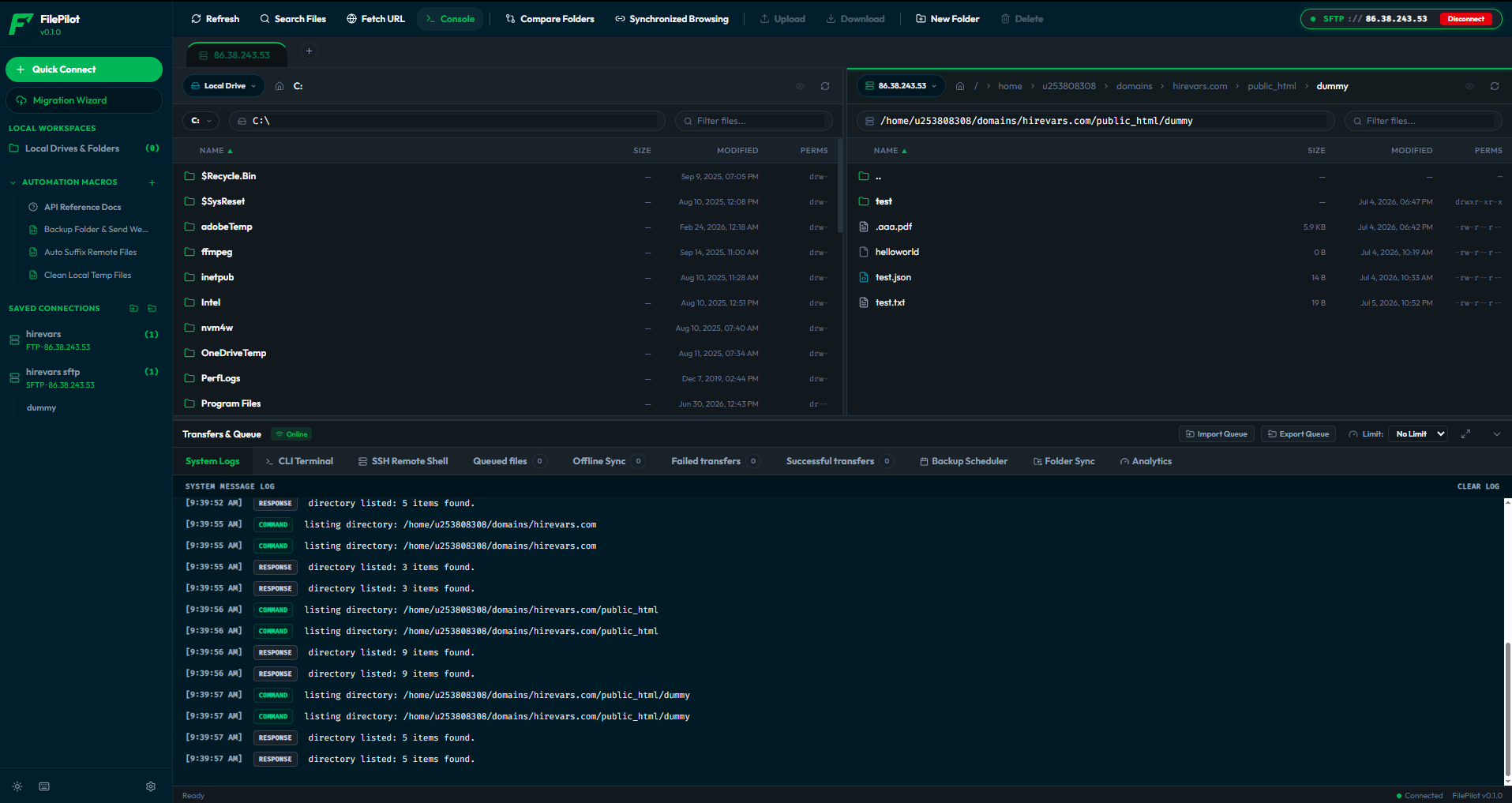
Dual-Pane File Browser

Your local machine on the left, your server on the right. Everything you need to manage files on both sides — without switching windows.

Split-Pane View
Side-by-side local and remote browsers with a resizable divider. Drag files between panes to transfer them.
Breadcrumb Navigation
Click any part of the path bar to jump directly to that directory, no typing needed.
Preview Sidebar
Click any file to see its size, permissions, modification date, and a content preview instantly.
Image & File Preview
Open images and text files directly in the app without downloading them to your desktop first.
Drag & Drop
Grab files from your OS file explorer and drop them straight into either pane.
Pinned Folders
Bookmark directories and servers. One click to connect and navigate — no re-entering credentials.
Folder Comparison
Color-code files that exist only on one side or have changed, so you spot differences instantly.
Synchronized Browsing
Lock both panes. Navigate into a subfolder on one side and the other follows automatically.
Directory Analysis
Right-click any folder to see a breakdown: files by type, size distribution, biggest files, and age.
Advanced Search
Search for files by name, extension, size, or date across the entire directory tree.

Work on Files Without Leaving the App

Edit, compare, rename, compress, and move files — all directly from the dual-pane interface, on both local and remote servers.

Built-in Text Editor

Edit any remote file directly in FilePilot. Changes are saved back to the server the moment you hit save — no download/re-upload cycle.

Diff Viewer

Compare two versions of a file side by side with highlighted differences. See exactly what changed before deciding which to keep.

Batch Rename

Rename dozens of files at once using patterns — add a prefix, strip a suffix, apply a regex, or find-and-replace with a live preview.

Change Permissions

Set Unix permissions with a visual editor. Toggle read, write, and execute per user, group, and others — no memorizing chmod numbers.

Server-Side Compress

Create ZIP or TAR.GZ archives on the server itself. The compression runs over SSH, so you're not downloading gigabytes just to zip them.

Server-Side Extract

Unzip or untar archives directly on the server without downloading anything locally, saving bandwidth and time.

Fetch URL to Directory

Give FilePilot a URL and it downloads the file straight into whichever directory you have open — no download-then-upload.

Copy Between Servers

Transfer files directly from one server to another. SFTP on the left, S3 on the right — move files between them in one drag.

Built for Speed and Reliability

FilePilot's Rust-powered transfer engine doesn't just move files — it moves them as fast as physically possible, and recovers gracefully when things go wrong.

Multi-Threaded Transfers

Splits large jobs across multiple parallel streams simultaneously. Instead of waiting for one file to finish before starting the next, it maxes out your available bandwidth from the start.

Real-Time Progress

Watch every transfer in real time: current speed, estimated time remaining, and completion percentage — all updating live.

Pause / Resume / Cancel

Full control per item in the queue. Pause for a video call, resume later, or cancel outright.

Resumable Uploads

If a transfer fails mid-way due to a network drop, FilePilot picks up from exactly where it left off — no re-transferring completed bytes.

Bandwidth Scheduler

Set automatic speed limits: slower during business hours, full speed overnight when no one else needs the network.

Checksum Validation

After every transfer, FilePilot computes SHA-256 hashes of both source and destination. If even one byte got corrupted, it catches it.

Webhook Alerts

Get notified in Slack, Discord, Teams, or any custom URL the moment a transfer succeeds or fails.

Speed Analytics

A live speed graph showing your last 30 data points. Spot bottlenecks and verify your connection is performing as expected.

Transfer History

A log of your last 100 completed and failed transfers with full status details.

Queue Export & Import

Save your entire transfer queue to a file and reload it later — or share it with a colleague to replay a complex batch job.

Folder Synchronization & Conflict Resolution
[ ZOOM ]

Backup Scheduler & Folder Sync

Schedule automated backups and keep directories synchronized between local and remote — with intelligent conflict resolution when both sides have changed.

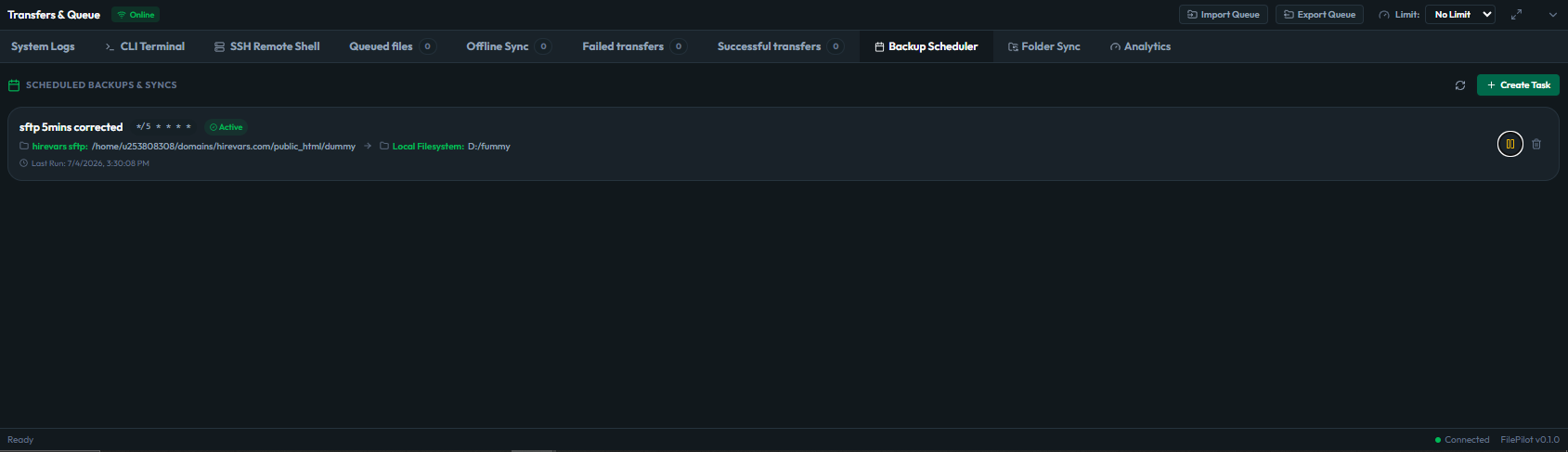
Backup Scheduler
Schedule any transfer to run automatically — daily backups, hourly log exports. Enable or disable schedules without deleting them.
Folder Sync
Two-way, upload-only, or download-only sync. Exclude folders like node_modules or .git with simple ignore patterns.
Directory Comparison
Before syncing, see exactly which files need to go up, which need to come down, and which have conflicts.
Conflict Resolution
When the same file changed on both sides, see a preview of both versions and choose which one wins — no blind overwrite.
Selective Sync
Uncheck any files you don't want to sync. All differences are pre-selected, but you can be surgical about what moves.

Offline Sync Queue

Transfers that fail because you lost connectivity are not lost. FilePilot detects the outage instantly and holds every pending transfer in a safe queue until you are back online.

Offline Detection FilePilot monitors your network in real time. The moment your internet drops, it holds all pending transfers safely in a queue.
Queued Transfers Any transfer triggered while offline is queued rather than failing. They wait safely for the connection to return.
Auto-Reconnect The instant your network comes back, FilePilot drains the queue in order — no manual retry needed.
Credential Security & Vault Lock
[ ZOOM ]

Your Passwords Stay Private

Your passwords are locked with strong encryption on your own device. FilePilot never sees them, and nothing is ever sent to an outside server.

Master Password Seal
One master password derives an encryption key through 600,000 rounds of PBKDF2. If someone steals the database, it's worthless without your password.
AES-256-GCM Encryption
Every password, SSH key, and secret is encrypted on-device using AES-256-GCM before being stored. FilePilot has zero knowledge of your credentials.
Lock / Unlock
Lock the vault with one click. Configure auto-lock on minimize or screen lock. When locked, no connections can be made.
IP Allowlisting
When using the Enterprise Vault, restrict which IP addresses or subnets can pull provisioned profiles — block everyone outside your VPN.
Connection Profiles & Quick Connect
[ ZOOM ]

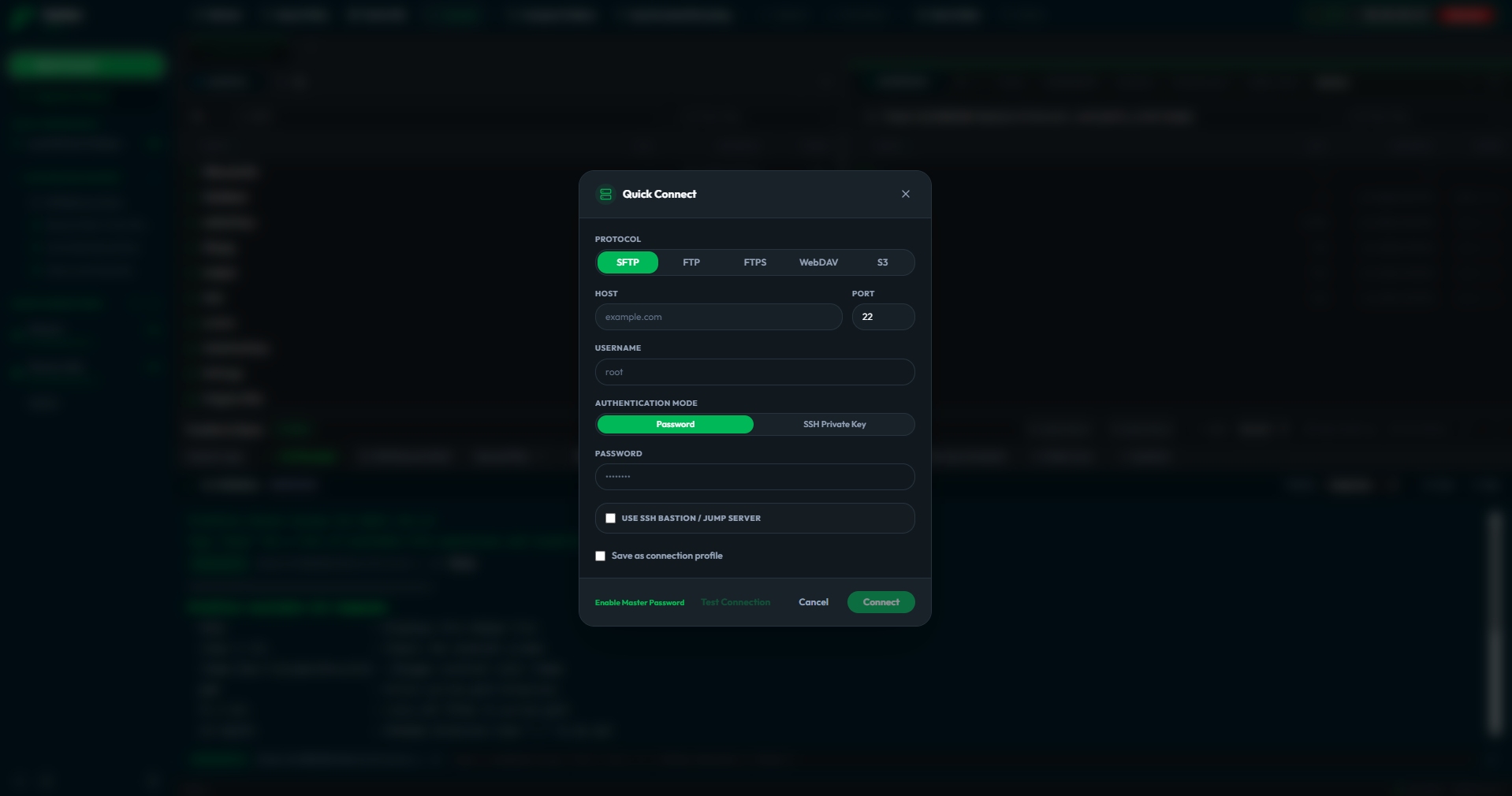
Connection Management

Save, organize, and instantly connect to all your servers from one place — or let your IT team push profiles to you automatically via the Enterprise Vault.

Saved Profiles
Save all your server connections as named profiles. One click to connect — no re-typing anything.
Quick Connect Bar
Type sftp://user@hostname:22 into the bar and hit enter. Connected in seconds without creating a saved profile.
Jump Server Support
Reach private servers through a bastion host. FilePilot handles the SSH chaining transparently.
Enterprise Vault Sync
Enter one access token from your IT team and FilePilot pulls down all your permitted server profiles automatically.
Audit Reporting
Every transfer on a vault-provisioned connection is automatically reported back to your organization's audit log.
Version Backup
Uploads to vault-linked servers automatically create version snapshots that your IT team can browse and restore.
JavaScript Macro Editor & Automation
[ ZOOM ]

Automate Repetitive Tasks

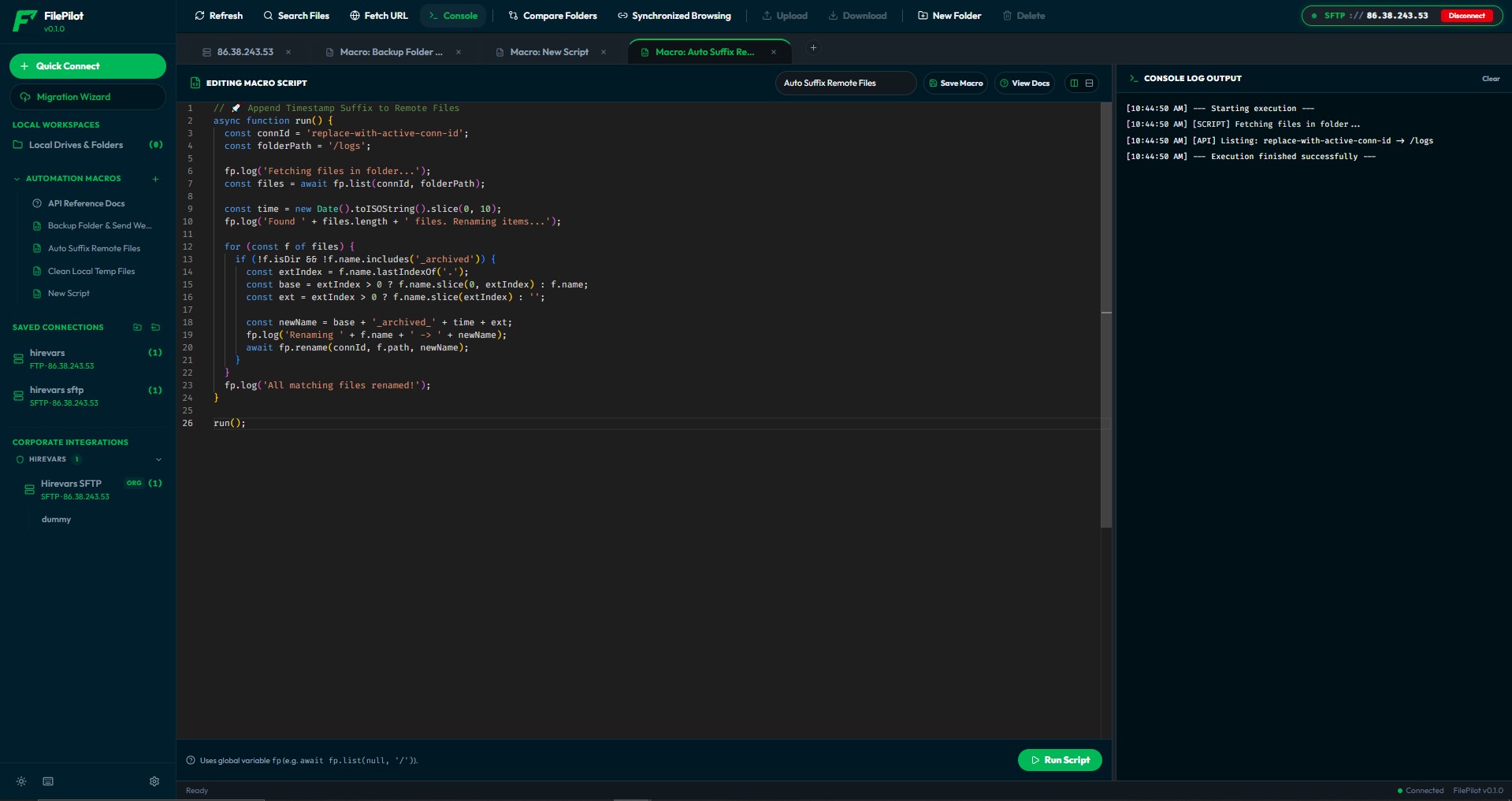
Automate repetitive tasks with plain JavaScript inside a safe, sandboxed environment. Write a script once and run it whenever you need it.

JavaScript Macros
Write automation scripts using plain JavaScript inside a safe sandbox — no external tools required.
Event Triggers
Run a macro automatically when you connect, disconnect, or launch the app. Schedule a backup every time you log in.
Built-in API
Your scripts get fp.copy(), fp.list(), fp.rename(), fp.delete(), and fp.notify() — full file operations and webhook alerts in one-line calls.
Template Library
Don't start from scratch. Pre-loaded templates for backups with Slack alerts, batch renaming, and temp file cleanup.
Code Editor
Write and debug macros in a full in-app code editor with live execution log output.

Plugin System

Extend FilePilot with custom protocols, panels, and settings — without modifying the core application.

Plugin SDK

Install plugins from a manifest file. Enable or disable them on the fly without restarting the app.

Custom Protocols

Add entirely new protocol types — a proprietary cloud API, an enterprise file server — appearing as native connection options.

Custom Panels

Build a deployment dashboard or log viewer and integrate it seamlessly into the app layout.

Custom Settings

Each plugin gets its own settings screen with proper typed inputs — text fields, passwords, toggles, and numbers.

Sandboxed Execution

Plugins run in a controlled sandbox. They can't access arbitrary file paths or make unexpected network calls.

Built-in Terminal

Run commands right where you manage files. Your file browser and your shell live side by side — no more switching between FilePilot and your terminal app.

Local Terminal A full terminal emulator built into FilePilot. Run local shell commands without switching windows.
SSH Terminal Open a live SSH session to any connected remote server. Browse files in the pane and run commands simultaneously.

Fast for Everyday Use

Every interaction in FilePilot is designed for speed: keyboard shortcuts, command palette, multi-tab workflow, and a migration wizard to bring your existing setups.

Command Palette

Press Ctrl+K to open a searchable command palette. Find any action, switch connections, navigate to a file — all without touching the mouse.

Dark / Light Theme

Choose between a crisp dark theme and a clean light theme. Your preference is saved and restored automatically.

Multi-Tab Interface

Open multiple server connections in separate tabs and switch between them instantly — like browser tabs for file transfers.

Keyboard Shortcuts

Every action has a shortcut. Open the reference modal to see the full list and never reach for the mouse for common tasks.

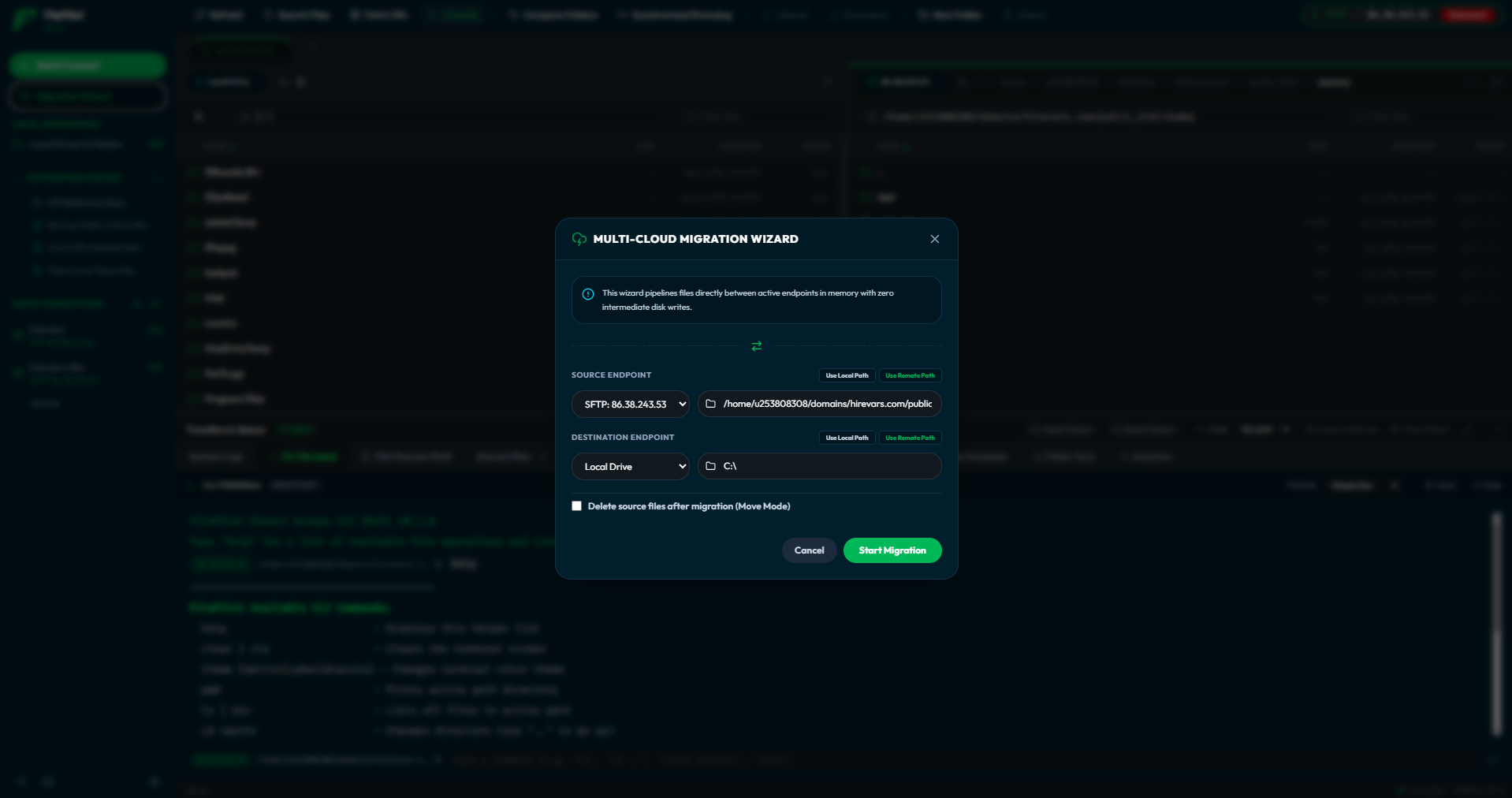
Migration Wizard

Switching from FileZilla or WinSCP? Import all your saved sites and credentials in one step. Zero re-entry.

Onboarding Wizard

First time? The wizard walks you through master password setup, creating your first connection, and understanding the interface.

Collapsible Sidebar

Bookmarks, saved connections, and panel shortcuts. Collapse for more space, expand for quick access.

Cross-Platform

One app, every OS. Windows 10+, macOS Big Sur+, and all major Linux distributions from a single codebase.

Frequently Asked Questions

No. FilePilot is built on Tauri, which uses your OS's native webview. The backend is 100% Rust, ensuring minimal RAM usage and blazing-fast I/O compared to Node.js or Electron-based alternatives.

They are stored locally in an SQLite database, encrypted at rest using AES-256-GCM. You must unlock the vault with your Master Password to access them. FilePilot has zero knowledge of your credentials.

Yes, absolutely. The Desktop Client is a completely standalone application. The Enterprise Vault is optional and only needed for teams that require centralized access control and audit logging.

FilePilot runs natively on Windows 10+, macOS Big Sur+, and all major Linux distributions (Debian, Ubuntu, Fedora, Arch). One codebase, all platforms.

Yes. Both the Desktop Client and Enterprise Vault are 100% free and open source under the MIT License. No premium tiers, no telemetry, no ads.